


The PHP project announced two critical remote code execution vulnerabilities on 21 Oct 2026. This article documents the steps I took to patch my Ubuntu servers, which get PHP from the ondrej/php PPA.
If you have not joined the PHP Discord, it is worth joining.
The Vulnerabilities
| CVE | Advisory | Issue |
|---|---|---|
| CVE-2026-109618 | GHSA-w8hw-w9fx-j79w | RCE via OOM corruption |
| CVE-2026-109619 | GHSA-6wmf-4rv5-p3rp | RCE via stale global state |
Both are fixed in PHP 8.5.12, 8.4.27, 8.3.36 and 8.2.35. Every PHP installation that serves web requests is at risk, PHP-FPM included. The advisory rates Apache with mod_php the highest, with a demonstrated exploit where an unauthenticated request triggers the attack before any application code runs. PHP 8.1 and older no longer get fixes from the PHP project.
The examples below use PHP 8.3 on Ubuntu 24.04 (noble), so the target is 8.3.36. Swap in your own branch and release, and repeat the steps for every PHP branch installed on the server.
Step 1 - Wait for the PPA build
The PHP project releases source code. On Ubuntu, the fixed version arrives only after the PPA has built packages for each PHP branch and Ubuntu release, so there is a wait.
-
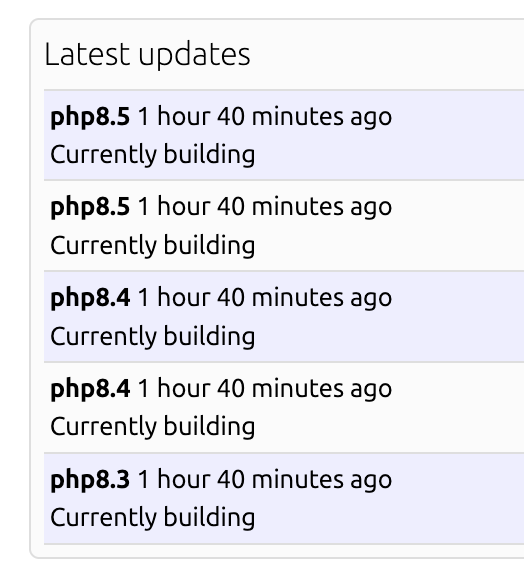
Monitor the PPA's builds in progress: https://launchpad.net/~ondrej/+archive/ubuntu/php/+builds?build_state=building
-
Wait until the build for your PHP branch and Ubuntu release has completed (See Image 1).
NOTE: The advisory lists interim measures for servers that cannot update immediately, such as session.upload_progress.enabled=0. They reduce exposure to specific attack paths but do not make an installation safe, so they are no substitute for the update.
Step 2 - Check the fixed version is available
-
Sign in to the server and refresh the package lists:
$ sudo apt update -
Check that the fixed version is listed. For example:
$ sudo apt list --upgradable php8.3/noble 8.3.36-1 ... -
If it is not there yet, repeat steps 1 and 2. A completed build still has to be published to the PPA before apt can see it, which can take a while.
Step 3 - Upgrade
-
Run the upgrade:
$ sudo apt upgrade -
Rerun it until every package is downloaded. Because the vulnerabilities are critical and high profile, servers worldwide are pulling the same packages at the same time, and the downloads can keep failing:
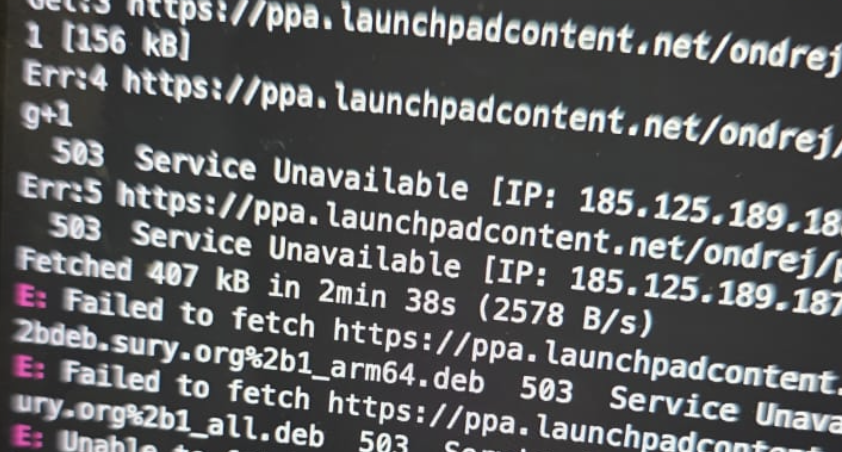
NOTE: apt keeps the packages it has already downloaded in /var/cache/apt/archives, so each rerun fetches only what is still missing. Raising apt's retry count, e.g. sudo apt -o Acquire::Retries=10 upgrade, saves some of the manual reruns.
Step 4 - Verify and reload PHP-FPM
-
Verify the installed version of both the CLI and PHP-FPM:
$ php -v PHP 8.3.36 (cli) (built: Oct 21 2026 14:31:50) (NTS) ... $ php-fpm8.3 -v PHP 8.3.36 (fpm-fcgi) (built: Oct 21 2026 14:31:50) ... -
Reload PHP-FPM. The running workers stay on the old, vulnerable build until FPM is reloaded:
$ sudo systemctl reload php8.3-fpm -
Confirm the service is
active (running):$ systemctl status php8.3-fpm
NOTE: With Apache and mod_php, PHP runs inside Apache, so restart Apache instead (sudo systemctl restart apache2).

