


This article documents the step to run Gemma4 locally via Google Chrome's on device model capability.
Chrome ships a set of built-in AI APIs that run a model on your own machine. I have followed the initial specification with nano model and document them in a few previous articles (this, others). In an recent announcement, Gemma4 is now available via on device model as a Dev trial. So I am curious to find out in 2026, with Gemma 4, is the on-device model good enough to summarise a technical article?
Setup
- Download Chrome v153+ (Currently available in the canary and dev channel)
- Launch the browser and go to
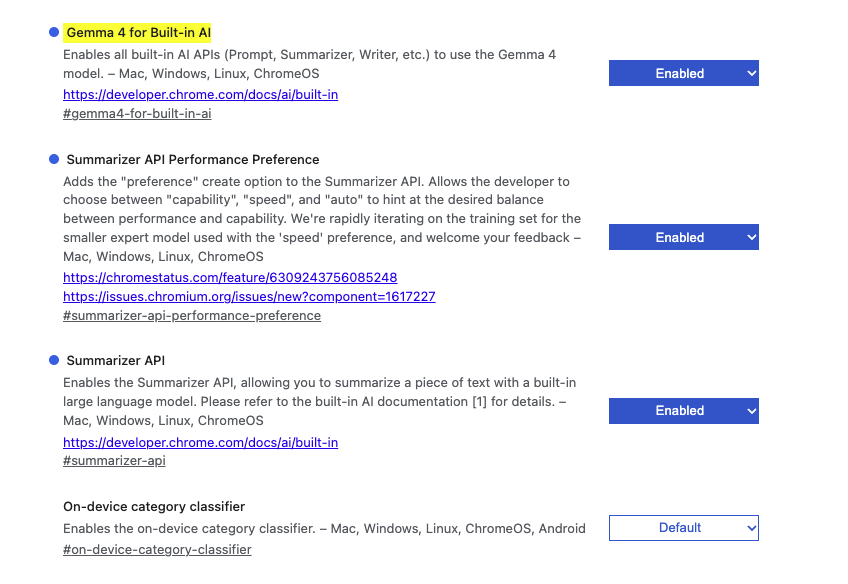
chrome://flags/#gemma4-for-built-in-ai - Enable this flag, and also check the
Summarizer APIflag is enabled. (See Image 1) - Go to
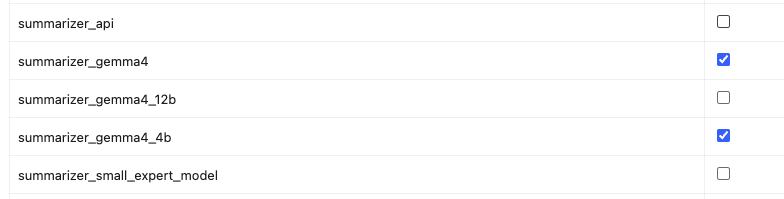
chrome://on-device-internals/and navigate to Broker state tab. Check the relevant checkbox -summarizer_gemma4. (See Image 2) - Uncheck the
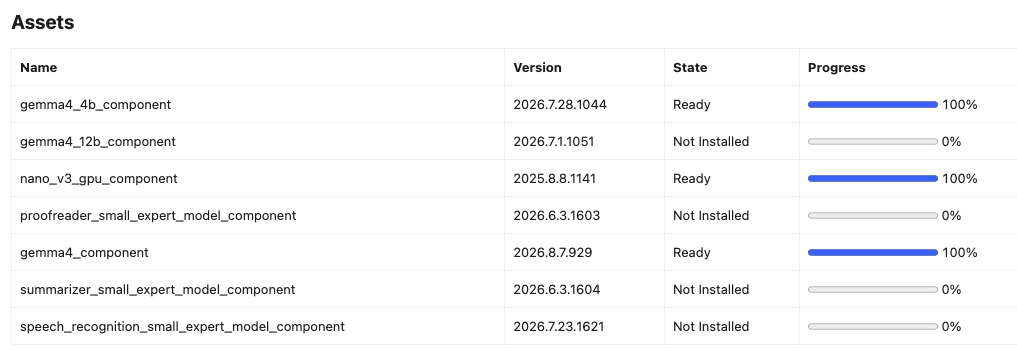
nano v3 entryon the same tab, soGemma4is the only summarizer left standing. - Wait for the download to complete. (See Image 3)
(Image 1)
(Image 2)
(Image 3)
Step 5 is not optional if you actually want to test Gemma4. Google does not document how Chrome chooses between Gemma4 and nano v3 when both are installed - there is no API to ask for one by name, and nothing in the response tells you which one answered. Turning nano off is the only way I found to be relatively certain.
Sample code
- Google has provided a comprehensive documentation here.
- I have done modification to fit my need.
if (!('Summarizer' in self)) {
    throw new Error("On-device AI is not available on this browser.");
}

const longText = document.querySelector("#article-body").textContent;
const output = document.querySelector("#summary");
const wordCount = longText.trim().split(/\s+/).filter(Boolean).length;

const options = {
    sharedContext: "This is an article published on a software development blog.",
    type: 'tldr',
    format: 'plain-text',
    length: wordCount > 150 ? 'long' : 'medium',
    expectedInputLanguages: ['en'],
    expectedContextLanguages: ['en'],
    outputLanguage: 'en'
};

const availability = await Summarizer.availability();
if (availability === "unavailable") {
    throw new Error("On-device AI is not available on this browser.");
}
if (availability === "downloading") {
    options.monitor = (m) => {
        m.addEventListener('downloadprogress', (e) => {
            console.log(`Downloaded ${e.loaded * 100}%`);
        });
    };
}

const summarizer = await Summarizer.create(options);
const stream = summarizer.summarizeStreaming(longText, {
    context: 'Analyse the content and provide a suitable headline. Do not include any code in your result.',
});

for await (const chunk of stream) {
    output.textContent += chunk;
}
Test it
Same source article for all three models - An article about Capistrano Deployment, about 1,300 words.
gpt-5.6-terra
This updated guide explains how to deploy a modern Rails application with Capistrano, covering current credentials, Propshaft, Ruby 4 and Bundler 4, Passenger, and Solid Queue workers. It recommends linking shared configuration files, validating server setup before deployment, and correcting outdated defaults for Bundler, migrations, and Passenger restarts. It also addresses accumulating Bootsnap cache files caused by release-specific paths, recommending delayed cleanup to reduce disk use.
Gemma4 2026.8.7.929 (On Chrome Dev 154)
The author updated their deployment configuration based on changes in Capistrano and modern Ruby versions, noting several key departures from the 2017 guide. These changes include updating file paths for secrets, setting the default pipeline for assets, and configuring Bundler settings to correctly for Ruby 4. Finally, the post details various steps for setup, server configuration, and deployment, including handling for Solid Queue and nap cache pruning.
nano v3 2025.8.8.1141 (On Chrome Stable 151)
This document details deploying a Rails 8.1 application with Ruby 4.0.6 using Capistrano 3.20.1. It covers setup steps including adding gems, configuring Capistrano, preparing the server with rbenv and directory creation. The guide also explains how to provision linked files, restart Solid Queue workers, and addresses defaults like `bundle_version`, bundle configuration, conditional migrations, passenger restarts, and Bootsnap cache cleanup. The final section presents a comprehensive `deploy.rb` file incorporating all the configured settings.
Observation
I send the original article, together with the 3 outputs to Claude Opus 5 for a comment. The followings are what I obtained:
- All three are usable. No invented gems, no fabricated commands, none of the confident nonsense that would embarrass me on a live page. For a meta description or a tl;dr box, any of these clears the bar. That alone is the headline: a model running inside the browser, costing nothing, is now good enough for this job.
- Gemma4 was the only one that worked out why the article exists. It opens with "noting several key departures from the 2017 guide". The source article's own Background says "I wrote Deploy Rails App Using Capistrano in December 2017, against Capistrano 3.10 and Ruby 2.4.2" — so
Gemma4reached past the how-to and picked up the frame the whole piece hangs on.gpt-5.6-terragets close with "This updated guide" but never says updated from what.nano v3does not register the framing at all. For a summary a reader uses to decide whether to click, "this replaces a guide that is nine years out of date" is worth more than any individual version number. - nano v3 still writes a table of contents. "The final section presents a comprehensive deploy.rb file incorporating all the configured settings." That is a description of the document's shape, not of its argument. In fairness the source is explicitly sectioned into numbered Parts, which makes walking the outline the path of least resistance — but the other two models declined to take it. Compare the endings:
gpt-5.6-terracloses on "recommending delayed cleanup to reduce disk use", an actual recommendation.nano v3closes on where the code block is. - Gemma4's tells are mechanical, not factual. "configuring Bundler settings to correctly for Ruby 4" is missing a word, and " nap cache pruning" is Bootsnap chewed in half. Neither is a hallucination — the article does cover secrets paths moving to credentials.yml.enc, Propshaft as the default pipeline, Bundler 4 defaults and Bootsnap cache pruning, so every underlying fact is right — but both are the kind of thing you notice instantly in a search result and never notice in a collapsed summary box. That distinction decides where you can ship this: fine for a button a reader presses, not fine for text you bake into
<meta name="description">unattended. - You cannot tell which model answered. This is the sharpest practical limit. With both models installed, Chrome picks one by rules Google has not published, and the API gives you no way to request a specific model or to find out which one ran. Every summary in this post is only attributable because I turned the other model off first.
- The real win is not quality. It is that the summary costs nothing, needs no key, sends no article text to anyone, and works on a plane. For a personal blog that is a genuinely different set of tradeoffs than an API call, and it is why the button stays.
Where I have landed: the server-side summary is still the one baked into the page metadata, because it is the tightest of the three and the only one that reliably ends on the article's actual conclusion. On-device is the button a reader presses when they want a tl;dr of their own. Gemma4 closed most of the gap in this test, and given it is a dev-channel build, I expect a revisit when it actually goes into beta / GA.

